Changelog icon Game changelog

Dual-type move cooldowns
Fixed an issue that prevented dual-type moves, including Leechseed and Ingrain, from displaying their cooldown correctly in the Moves window. Their cooldown timers and progress bars now update properly. Cooldown durations remain unchanged.

New Ability Urge tracker
Keep track of each Ability Urge's cooldown in its own window, even after unequipping it or switching held items. The tracker shows every Ability Urge you carry, including those inside nested bags, with a separate countdown or Ready status for each one.


• Automatically adjusts its height to the number of items, with scrolling for larger collections.

• Switch between full mode and a narrower compact mode showing only the item icon and cooldown.

• Move or minimize the window; its position, display mode and minimized state are saved.

• Enabled by default. To hide it, open Options → More and check Hide Ability Urge window, below Hide quick unequip button.

Only Ability Urges carried by your character are shown; items stored in lockers are not included.
Next update: two new daily bosses and a round of quality-of-life improvements

New daily bosses


• Nightmourne (level 100+, solo). Step on the witchfire spark to face it; every time it loses a quarter of its health it calls a pack of Misdreavus to its side. Free for everyone: no ticket needed, free accounts included.

• Tempest Wyrm (level 140+, solo or with up to 5 players). Gather on the five tiles and pull the lever. At 80%, 60%, 40% and 20% health it hides inside a storm shell that bounces damage back at your Pokémon (and a little at you): break the two statues with Normal-type moves to charge the Iron Fist Core and shatter the shell — but every statue that breaks fires a beam at the core, so stay out of its path. Free for everyone: no ticket needed, free accounts included.

• Both follow the usual daily boss rules: a 20-hour cooldown per player and a personal reward bag.


Pokémon experience


• During boosted Pokémon experience rates, Pokémon that fought and then went back into their ball (or fainted) now get their share of the experience. Before, the ones up to level 74 on Platinum (49 on Diamond) got nothing, and only the Pokémon out of its ball was rewarded.

• Very big kills (bosses, raid legendaries) no longer give your Pokémon 0 experience: they now give up to the per-kill limit, which is also twice as high as before.


New: Undo & Redo for text editing

Accidentally deleted what you were writing or pasted the wrong text? You can now recover your edits directly in the client’s text fields.


• Ctrl+Z — Undo: undo typing, deletions, cuts and pastes.

• Ctrl+Y / Ctrl+Shift+Z — Redo: restore an edit you just undid.


Each text field keeps its own history, allowing you to undo several changes instead of having to rewrite everything.

New custom move icons

Added 1,516 custom move icons to action bars, the WASD auto-set window and the next-spell preview. The artwork reflects each move’s identity and mechanics, making moves easier to recognize at a glance. Moves without custom artwork retain their generic icons.

New achievement icons

Added 274 custom achievement icons, with artwork based on each achievement’s title and objective.

Stash improvements


• Mark frequently used items as favorites for quicker access.

• Favorites, search text and withdrawal quantity are remembered separately for each character on your computer.

• Withdraw items using 1 / 100 / Maximum, with up to 1,000 items per operation.

• Clearer operation results show what was completed and what remains pending.

• Fixed Re-stack stopping early: one request now continues until all compatible stacks have been merged.


Locker Manager improvements


• Select individual Pokémon, including separate Pokémon of the same species and level.

• Use Select filtered and Clear to manage your selection. Changing the filter preserves your selected Pokémon.

• Preview the selected Pokémon and destination before confirming a transfer.

• If only part of a transfer fits, the manager moves what it can and lists the remaining Pokémon with the reason.

• When the destination’s main level is full, transfers look for available space in eligible bags inside it, while respecting bag restrictions and the Market Locker limit.

• Pokémon can still return from the Market Locker to the main locker when the latter exceeds its total item limit, provided there is space to place them.

• Improved responsiveness when opening large lockers, filtering their contents and selecting Pokémon.


Container navigation

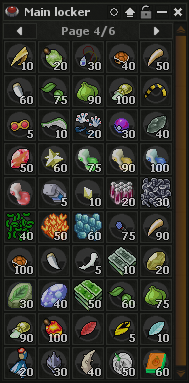
Added first and last page buttons. Click the page counter to enter a page number and jump directly to it.

Bug reports

Bug reports now open with Ctrl+Shift+B. Closing the dialog preserves your draft during the current client session, and a success message appears only after the server confirms that the report was saved.

New blackout window

Redesigned the blackout window with Pokémon-themed artwork and recovery messages. Each new blackout selects a message from a varied set, avoiding consecutive repeats during the same client session.

Other fixes and interface improvements


• Search: special characters such as [, % and . are now handled correctly.

• NPC trading: corrected maximum purchase quantities when buying with backpacks. Sell all consistently selects items accepted by that NPC and respects the batch limit.

• Cooldowns: move, held item and berry timers now catch up correctly after interface delays.

• Chat controls: moved New action bar away from the chat buttons, keeping channel controls together.

• Proc messages (ability, held item, charm, PREY! and PROFICIENT!): every one of them now shares the same short cooldown (0.5 s) instead of each having its own (PREY! used to wait 3 seconds). Throwing two balls in a row at your prey now shows PREY! on both. As always, the cooldown only limits the text on screen — the bonus itself applies every single time.

• TM Mixer: TMs kept in a backpack inside another backpack are now counted correctly — each extra bag level no longer doubles the amount shown in the list.
Website: new Guilds section, Who is Online and Latest Deaths

Guilds (rebuilt from scratch, works on phones)


• Guild list: each guild shows its logo, message of the day, members, players online, average level, last activity and guildhall. Tabs per world, search, six sort orders and a "Show empty" option. World tabs and sort orders have their own links, so you can share them.

• Guild page: stats, owner, founding date and guildhall, plus the members grouped by rank with level and last seen, a member search and an "Online only" filter. Links in the message of the day are now clickable.

• Join or leave with your characters right from the guild page.

• Guild management in one page: invite players and revoke invitations, set each member's rank (Vice-Leader or Member) and nick, kick, edit the message of the day, rename the ranks, upload the logo and delete the guild.

• Transfer leadership: hand the guild over to a Vice-Leader or Leader. They become the owner and Leader, and you stay on as Vice-Leader, same as !passleadership in-game.

• Vice-Leaders can now invite players, revoke invitations and kick Members from the website.

• Guild logos uploaded as PNG or JPG now show up (only GIF logos used to appear).

• Member counts only include active characters on the guild's world.

• Website changes that affect a character (invitations, joining, leaving, rank, nick, kicks) need that character to be offline. While online, use the in-game commands.


Who is Online


• Tabs per world with the number of players online; "All worlds" shows one section per world.

• Sort by level, name or time online, and search by name or guild.

• Each player shows their outfit, level, guild and how long they have been online.

• Loads faster and works on phones.


Latest Deaths


• Tabs per world with the deaths of the last 24 hours.

• 50 deaths per page, with Newer and Older pages.

• PvP deaths are tagged and player killers link to their character. Hover the time to see the exact date.

• Loads faster and works on phones.


Pokédex


• Each form now lists the Z-Crystals it can use and how: by its type, a move it learns or a TM it can learn. Z-Moves are not in the game yet.
Website: three new pages and a round of improvements

New: Pokédex (Resources menu)


• Browse every Pokémon: search by name or number, or filter by type, region and rarity.

• Each Pokémon has its own page with its overview, type matchups, evolutions, abilities, skills, moves, the TMs it can learn and its drops. Alternate forms get their own tab.

• Where to find it: every spawn zone marked on the live map, with the nearest town, what you need to get there and the exact coordinates, which open that spot on the map. "Show them all on the map" opens the live map with all of its zones.


New: Market Prices (Resources menu)


• See what items and Pokémon really sold for on the in-game market, on Diamond and Platinum.

• Items: typical price, price range and 7-day trend from the last 30 days of sales, plus the cheapest offer listed right now. Each item has its own page with a price chart and its open listings.

• Pokémon: no two are alike (level, ball, TMs, addon, auras), so each Pokémon has its own page. Enter your Pokémon's level, TMs, ball and extras in "Price yours" to see what the most similar sales went for. The page also shows a price-by-level chart and the list of sales with their level, ball, ability, TMs and extras.

• Sales are shown anonymously: no names, only the day of each sale.


New: Now Active (Community menu)


• Everything running right now on Diamond and Platinum, in one place: the donation promotion, the Discord booster goals and bonuses, the current lottery, and each world's rates and boosted Pokémon, with live countdowns in server time.

• Coming up: raids, lottery draws, promotions, booster campaigns and daily rewards for the weeks ahead.

• Rewards running: the current daily rewards and battle passes.


Improvements


• Highscores: new Pokédex, Duel Wins and Monthly Medals rankings (Monthly Medals counts the gold, silver and bronze medals won in the Monthly Ranking). "Find my rank" takes you straight to your page with your row highlighted, the world you pick stays selected as you browse, and every ranking page has its own link you can share.

• Houses: every house can be reached now. The page count did not match the list, so many houses never showed up.

• TM Tasks: tasks that need premium are now marked from the game's own data (the page used to guess, and marked some free tasks as premium). The page also loads much faster.

• The Resources menu now links Leveling Spots.

Coming with the next client update (12.0.3.2) + server restart


Boss health bars


• Boss health bars are no longer exclusive to the daily bosses: every boss now shows its bar while it is on your screen — raid bosses, world bosses (the Mega quests), mini bosses, event bosses and quest/trial bosses — each one labeled with its category (RAID, WORLD BOSS, MINI BOSS, EVENT, QUEST, DAILY BOSS).

• Every boss has its own bar design: the frame's ornaments follow the boss's type (flames, waves, crystals, wings, claws, bolted plates...) and its colors come from the boss itself — over 170 unique bars, from Articuno and Lugia to the mini bosses and the seasonal event bosses.

• Several bosses at once: up to 3 bars are stacked at the same time; if there are more bosses around, the next one takes the free spot as soon as a bar goes away.

• Boss bars now follow the boss's health in real time (including bosses that heal or change their maximum health mid-fight), and the bar comes back by itself if you walk away from the boss and return.

• The bar also shows up, and stays up to date, when the boss is on a different floor than you — for example when you watch the fight from the floor above.


Daily bosses


• The Primeval Magma: when the magma hardens, each player now receives the bucket of water directly in their inventory (if the inventory is full it is dropped at your feet) and the message tells you exactly what to do with it — no more searching the arena for a bucket on the floor.


Floating texts (ability, held item, charm, prey, critical and other proc messages)


• When several messages trigger at the same time on the same spot they no longer pile up on top of each other: each one gets its own line, and if there is no room it shows up a moment later instead of hiding behind another message. Until now only the last one was readable, which made it look like an ability or held item had not triggered.

• Messages on neighbouring tiles no longer overlap each other either.

• Damage and healing numbers use the same layout.

• Under heavy action, or with a higher Optimization level, the newest messages are the ones that stay on screen, and proc messages no longer compete with damage numbers for space.


Options → Graphics


• Optimization level "Automatic": limiting the game framerate below 45 FPS no longer makes the client slowly drop to the lowest quality level (fewer texts, effects and creatures drawn). Automatic now adapts to the framerate limit you chose.


Live Stream


• With multi-thread rendering enabled, starting your stream no longer crashes the client on DirectX 11 (seen on AMD graphics cards), and stream thumbnails are no longer black on OpenGL.
Coming with the next client update / server restart

Boss health bars


• Daily bosses (The Primeval Magma and Marrowbreaker) now show an on-screen health bar at the top of the map: the boss portrait, its name, exact HP numbers and a frame themed per boss. The Primeval Magma's bar turns shielded while it is hardened and immune, and goes back to normal once you douse the fire fields.

• The bar can be dragged anywhere over the map view, and its position is remembered.

• Options → Boss Bars: choose the bar size (50% / 75% / 100% / 110%, default 75%) with a live preview, turn it on or off, set its opacity and reset its position.


Daily bosses


• The reward bag that appears when the boss is defeated can no longer be moved, picked up or traded — it is only the spot where each player claims their own reward. Reward bags that had been carried out of a boss room were removed (they never held any loot).

• The Primeval Magma: water buckets are removed from your inventory as soon as you leave the boss room.

• The Primeval Magma: fire fields, water buckets and fireballs can no longer land on tiles you cannot walk to — a fire field on an isolated tile could leave the boss hardened for good, with no way to finish the mechanic.


Map & UI


• Full map (Ctrl+Shift+M) and Interactive Map: the floating Clip / Twitch proof / Discord buttons now hide while the map is open and come back when you close it, so they no longer cover the map's "Center" button.

• Full map in the full-window view mode: the map no longer runs underneath the top menu, so the "Center" button is reachable there too.

• Approved Twitch streamers no longer get their Twitch proof button hidden underneath the Clip button after logging in.
Rebalanced / Improved:
- Red Gyarados (small tweak)


sky drop moved to passive > Downpour
dragon rage > Draco Beam
bounce > Dark Breath
Iron Tail > Aqua Jet

- Samurott


- Heracross / Mega Heracross
(Befuddle is now the strong aoe while Infestation the weaker one / in mega heracross case deadly scythes replaced Infestation instead of Befuddle)

- Forretress


- Cacturne


- Emboar


- Armaldo


Meteor Cannon - New rock type beam


- Pangoro


Parting Shot - now it's a move that only pulls pokemons instead of pulling/pushing


- Hisuian Typhlosion


Soul Freeze - new ghost type aoe that applies sleep


Hollow Curse - new weaker ghost type aoe


- Skuntank


Plague Spread - new weaker poison type aoe


- Huntail


Hydro Swipe - changed the way it works, now it's a 4x4 area that hits 4 times


- Gorebyss


- Walrein


- Reuniclus (small change)


Anticipation - new protection that lasts 8 seconds or untill wild pokemons deal a total of 50k damage, while getting "hit" the pokemon size increases once the protection duration ends or enough damage is dealt, the move explodes dealing up to 2.5k damage


- Kleavor


Rock Cleaver - new rock type aoe


- Palossand (small change)


- Kricketune


Cross Cut - new bug type aoe


- Magneton


- Magnezone


- Tyranitar / Mega Tyranitar


Dark Sphere - new 5x5 dark type aoe


- Corviknight


- Volcarona


Dizzying Buzz - new bug type stun that applies sleep


Frenzy - changed to be a new weaker bug type aoe


Flaming Scales - better version of Morning Sun, heals 50% hp and applies 40% damage reduction


- Golisopod


Aqua Blade - new water type aoe that also increases golisopod damage by 10% for 10 seconds


Ocean Surge - new water type aoe


- Marowak


Bone Club - now deals damage in 3x3 area


Bone Breaker - new ground type aoe


- Purugly


- Electabuzz


- Electivire


Lightning Fury - new 5x5 electric type aoe


- Magmar


- Magmortar


Dark Smoke - new fire type aoe that applies same type of stun as Smokescreen


- Mudsdale


Seismic Slam - new ground type beam


Ground Scales - works like Spore Counter


High Horsepower - new ground type aoe that hits twice, while the old move got renamed to Tectonic Push


- Mamoswine


Sand Vortex - new ground type aoe that also pulls and applies short stun of the same type as smokescreen


- Wailord


- Galvantula


Web Rain - new 5x5 bug type aoe that hits twice


Web Burst - new 4x4 bug type aoe


Silken Snare - works like shocking web


Sunflora


Gliscor (after restart)


Ground Spikes - new ground type area that hits 3 times in 5x5 range


Noivern (after restart)


Lunar Blessing - heals 50% health and reduces damage taken by 40%


Dragonburst - new dragon type aoe that also applies paralyze


Scale Blast - dragon type grass knot


Increased Rock Tomb and Living Coal area to 3x3
Added Anti Stun to Dark Bastion and Defend Order
Prey Pauser — new "Skip pause" option

The Prey Pauser now lets you opt a single prey out of pausing:


• Skip pause: turn off pausing for one active prey. It goes back to counting down in real time (as if you had no booster) and expires on its own — handy to cycle out a prey you don't want and reach fresh options, without spending a reroll.

• Per prey: your other preys keep pausing as usual.

• One-way, no going back: once you skip the pause on a prey it can't be paused again, and it gets unlocked (a prey you're letting run out can't be kept renewing). You'll be asked to confirm before it applies.
New content

Daily bosses — two new daily bosses are now available: The Primeval Magma and Marrowbreaker.

Quantum Ball — a new Poké Ball with a catch rate on par with Prism and Sunrise Balls. While the Pokémon you caught in it is your active Pokémon, it grants:


• +3.5% damage against daily bosses (The Primeval Magma & Marrowbreaker).

• 10% chance for task and achievement kills to count double — stacks with Twin Charm.

• An exclusive blue Quantum aura on Pokémon that don't already have one of their own.


TM Mixer — a new item that combines 10 TMs of the same type into 1 random TM of that type, excluding the ones you put in.


• 5 uses per mixer.

• Draws TMs from your Inventory, Autoloot and Stash, with a type filter and an Auto button to fill 10 in one click.

• Unused mixers can be sold on the market; used ones cannot.


Fixes


• "Use on My Pokémon" potion hotkey: no longer intermittently shows "You do not have a Pokemon out" while your Pokémon is out.

• Action bars: stack counts over 999 now display compact (1.5k, 250k, 1.5m) so the number no longer overflows under the use-type icon.
Depot Pagination & Item Stash
These changes arrive with client update 12.0.3.0 Rev 118 and the next server restart.

Depot Pagination


• Large depots now split into pages with navigation arrows — no matter how full your depot gets, everything you own is reachable again, not just the first items it could fit.

• Small depots and bags inside the depot are unchanged. Pages only appear when you actually need them.


Item Stash


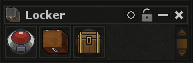
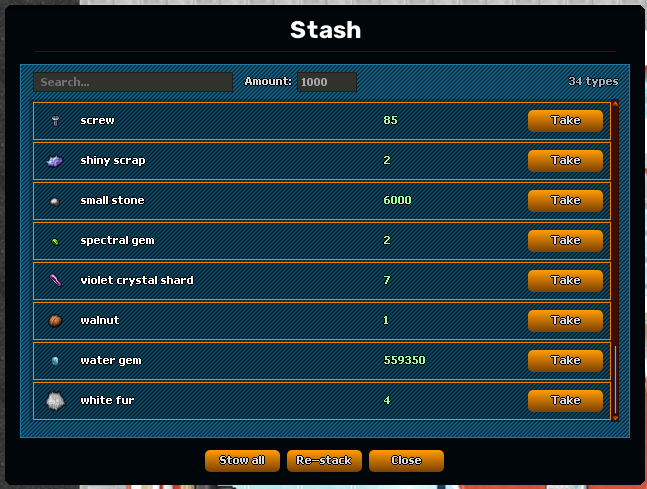
• A new stash for your stackable items, opened from your locker — a dedicated window with search, separate from your depot slots.

• Stow all — send every eligible stackable from your depot into the stash in one click.

• Stow individual — drag a single stack into the stash window.

• Re-stack — consolidate scattered stacks into full ones.

• Take — pull items back out, up to 1000 per withdrawal. If your bag is full, whatever fits is delivered and the rest stays safe in the stash.

• Stackable items that would otherwise pile up loose in your depot — autoloot overflow, and the contents of a house you lose — are now routed into your stash automatically. Anything that isn't stashable (containers, unique items, money) still goes to your depot as before.

• You must stand next to a locker, inside a protection zone, to use the stash — same as your depot.